



Want a clean, easy-to-remember address like play.yourdomain.com for your Minecraft server? This guide shows you how to link a domain name to your Minecraft server using DNS records.
The examples use an OVH domain, but the DNS setup is the same with any registrar. You’ll create an A record (to point to your server IP), and optionally an SRV record (to hide a non-default port).
If you get stuck, you can also browse more hosting tips on our blog articles.
What you need before you start
Make sure you have everything ready. DNS changes are simple, but you’ll save time if you gather the right info first.
A working Minecraft server
A domain name with access to its DNS zone
Your server IP address and port
Access to your registrar DNS panel (OVH, etc.)
📝 Note: DNS updates aren’t instantly visible everywhere. Propagation can take from a few minutes up to 24 hours, depending on resolvers and caching.
Example used in this tutorial: domain yoshun.fr. We want play.yoshun.fr to connect to a Minecraft server at 127.12.8.25:25570.
Create the A record (server IP)
First, you’ll create an A record that points a subdomain to your server IP. Log in to your domain provider, open the DNS zone, and add a new DNS entry.
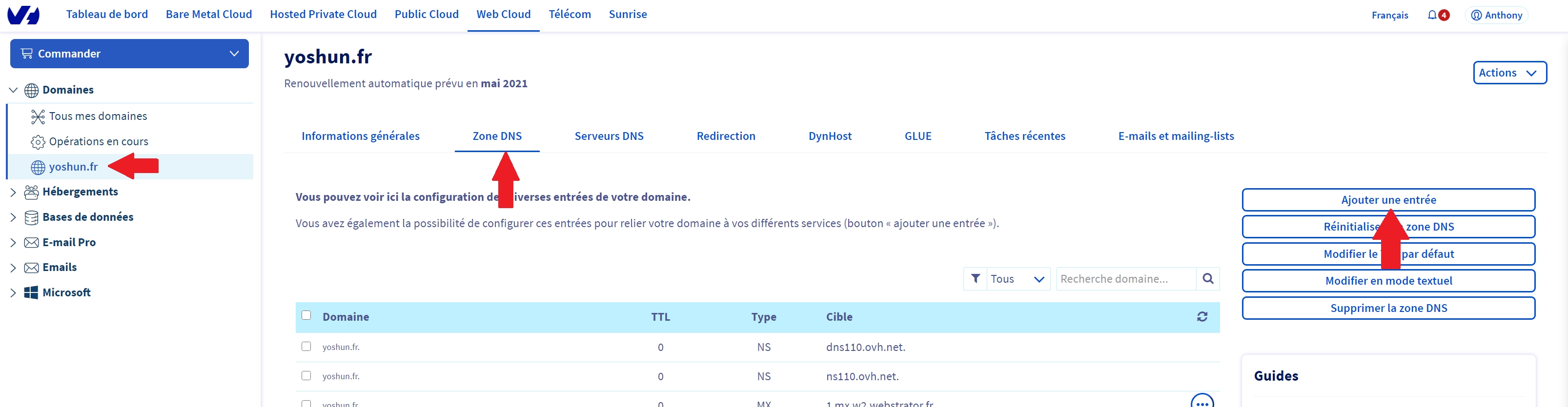
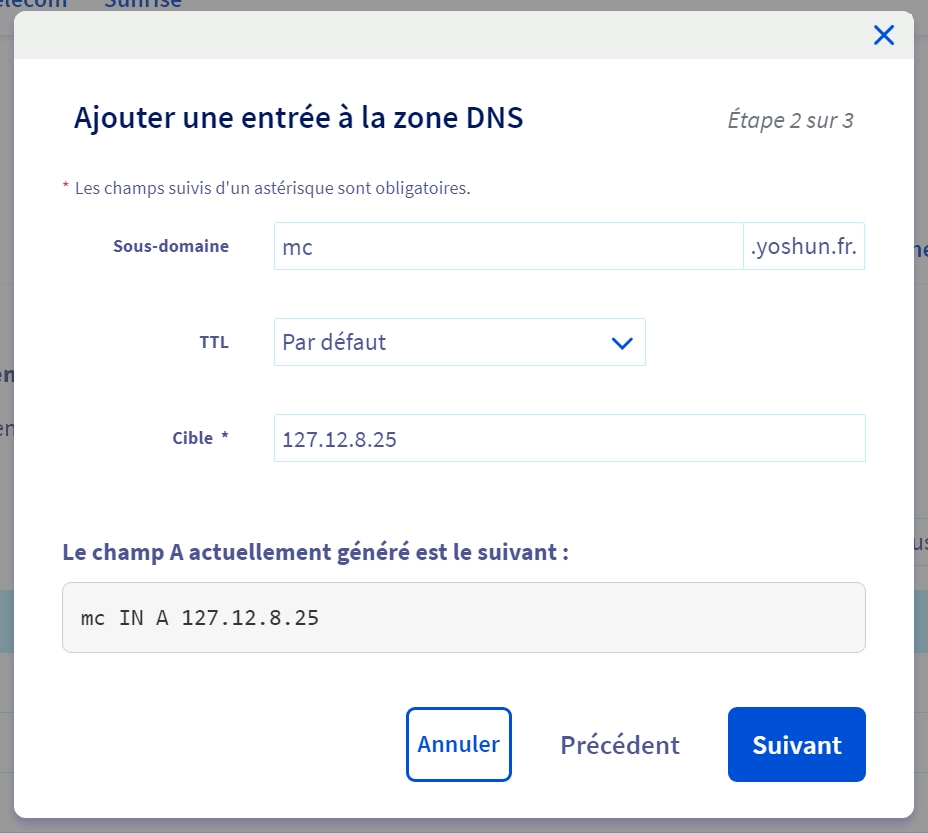
Select record type A, then fill the fields like this. The goal is to map a subdomain to your server IP only, without the port.
In Subdomain, enter the name you want (example: mc).
In TTL, keep the default value.
In Target, enter your server IP address without the port.
In our example, we set mc and target 127.12.8.25, which creates mc.yoshun.fr.
If your Minecraft server uses the default port 25565, this is often enough. You can connect directly using mc.yourdomain.com once DNS propagation is done.
💬 Good to know: If you have a dedicated IP and your server runs on 25565, you usually don’t need an SRV record.
If your server uses a different port (like 25570), you have two choices. Either you keep the port in the address, or you add an SRV record to hide it.
Option 1: Connect with mc.domain.com:25570
Option 2: Add an SRV record to use play.domain.com without typing the port
⚠️ Warning: Your A record name and your SRV “play” name can’t be the same. Use two different labels like mc and play.
Create the SRV record (hide the port)
This step is only needed if your server port is not 25565. The SRV record tells Minecraft which port to use when players connect to a clean address like play.yourdomain.com.
In your DNS zone, add a new entry and select record type SRV. Then fill the fields as follows.
In Subdomain, enter:
_minecraft._tcp.play
The play part is the address players will type, and it must be different from your A record name (example: A record = mc, SRV name = play).
In TTL, keep the default value.
In Priority, enter 0.
In Weight, enter 5.
In Port, enter your Minecraft server port (example: 25570).
In Target, enter the A record hostname (example: mc.yourdomain.com.).
In our example, the target is mc.yoshun.fr. and the dot at the end is important on many DNS panels.
🚨 Important: Don’t forget the trailing dot in the SRV target if your DNS panel expects a fully qualified domain name (FQDN), like
mc.yoshun.fr.
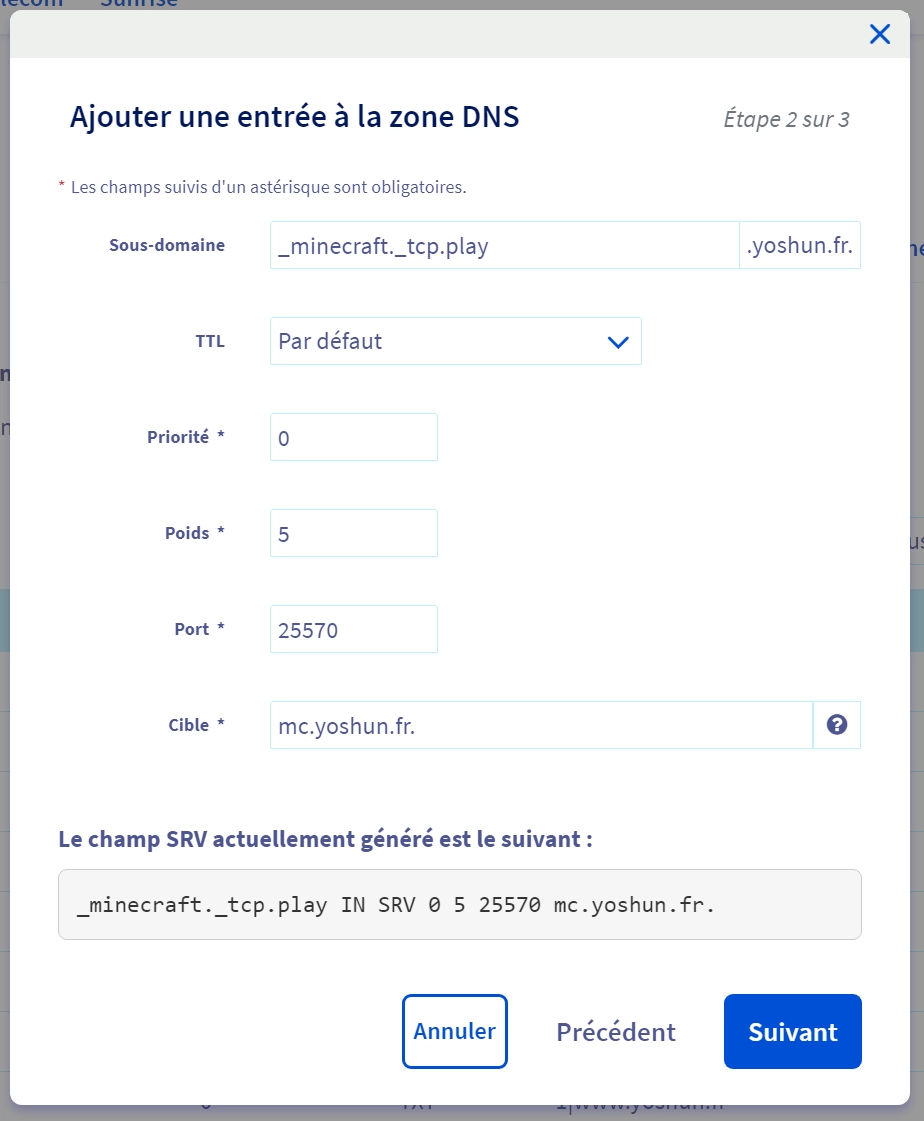
Once propagation is done, players can connect using play.yoshun.fr, and Minecraft will automatically use port 25570.
Questions frequent
How long does DNS propagation take?
It can be quick (a few minutes) or slower (up to 24 hours). Your TTL, ISP caching, and public DNS resolvers all affect the delay.
Can I use the same name for A and SRV?
No, avoid using the same label. Use something like mc for the A record and play for the SRV record to prevent conflicts.
Do I need an SRV record if my server uses port 25565?
Usually not. If your server is on 25565, an A record alone is enough, and players can join with mc.yourdomain.com.
Conclusion
You now know how to link a domain name to a Minecraft server: create an A record for the IP, and add an SRV record if you want a clean address without a custom port.
Need a server to plug your domain into? Try a Minecraft server free for 12 hours, no credit card required, and get your custom address online fast.

 22 January 2026
  Enjoy 10% off your first month of server with MineStrator using the code ACTU10!