



Your players use non-premium accounts and can’t join your Minecraft server? In this guide, you’ll see how to allow cracked versions on your server safely, step by step.
We’ll explain the risks, the settings you need to change in your panel and in the server.properties file, and what to watch out for with player data and whitelists. Follow the steps carefully and your cracked players will be able to join without breaking your server.
Before you enable cracked versions
Allowing cracked versions relies on a feature provided by Mojang that is being used outside its original purpose. Even if this practice has existed since the early days of Minecraft, Mojang has never officially allowed this kind of use.
When you enable cracked access on your Minecraft server, you expose it to serious security risks. The biggest one is identity theft: a malicious player can log in using the nickname of an operator or administrator and get all their permissions.
🚨 Important: These risks exist even if you never share your IP. Bots constantly scan IP ranges to find vulnerable servers.
To limit these risks, you must use an authentication plugin or mod such as AuthMe Reloaded. This kind of plugin forces players to register and log in with a password before they can play, which protects your staff accounts and your community.
⚠️ Warning: Securing your cracked Minecraft server is 100% your responsibility. Never run a cracked server without an auth plugin.
Impact on whitelist and player data
If your server is private, enabling the whitelist is still a good idea. However, when cracked versions are allowed, the whitelist works differently: the player must be online when you add them to it.
In practice, this means you need to temporarily disable the whitelist, let the player connect, then add them to the whitelist and enable it again. If you add a player who is offline, their unique identifier will be wrong and they will not be able to join later.
💬 Good to know: This behaviour is linked to how Mojang accounts and UUIDs work when
online-modeis disabled.
Also keep in mind that enabling cracked access changes how player information is stored. If you apply this change on a live server that already has data, existing player data will no longer match correctly.
This can cause issues such as lost inventories, missing homes, or broken links with mods and plugins that store data per player. Ideally, you should decide whether your Minecraft server will be premium-only or cracked before you open it to players.
Enable cracked versions from the panel
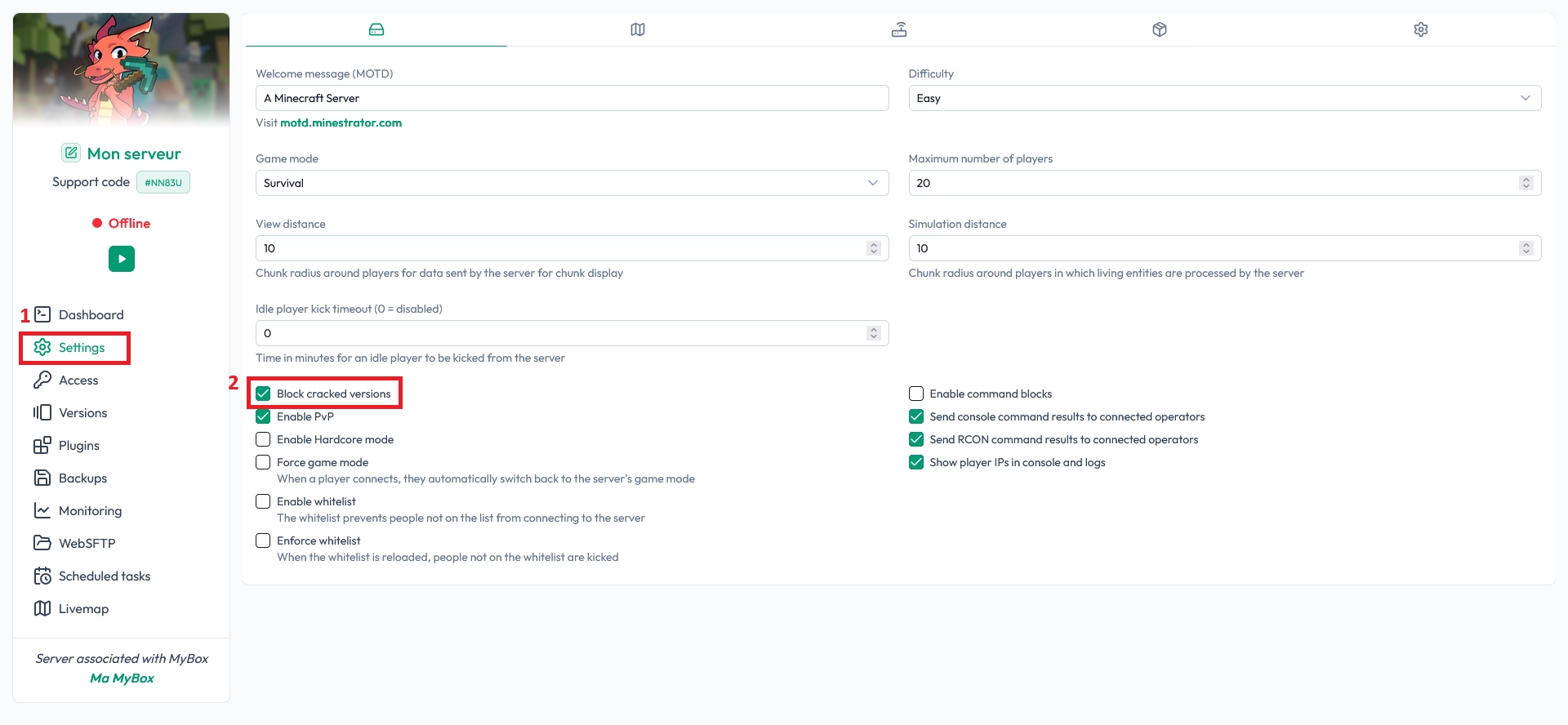
The easiest way to allow cracked versions on your Minecraft server is directly from your MineStrator panel, in the Settings tab of your server.
Open your MineStrator panel and select your server
Go to the Settings tab
Find the options related to account security
Uncheck both Block Cracked Versions and Enable Account Verification
Once these boxes are unchecked, restart your server so the changes are applied correctly.
📝 Note: Always restart your Minecraft server after changing security or connection settings, otherwise players may still be blocked.
Edit server.properties to allow cracked access
Some key settings for your Minecraft server are stored in the server.properties file. This file controls many aspects of your server, including whether Mojang account verification is required.
To allow cracked versions, you need to modify two specific options: online-mode and ensure-secure-profile. Both must be set to false so that your server stops checking Mojang authentication.
Access and edit the server.properties file
You can edit this file directly from the panel using the WebSFTP tab:
Open the Files tab on your server page
Locate and click on the
server.propertiesfileFind the lines for
online-modeandensure-secure-profileChange their values to
false
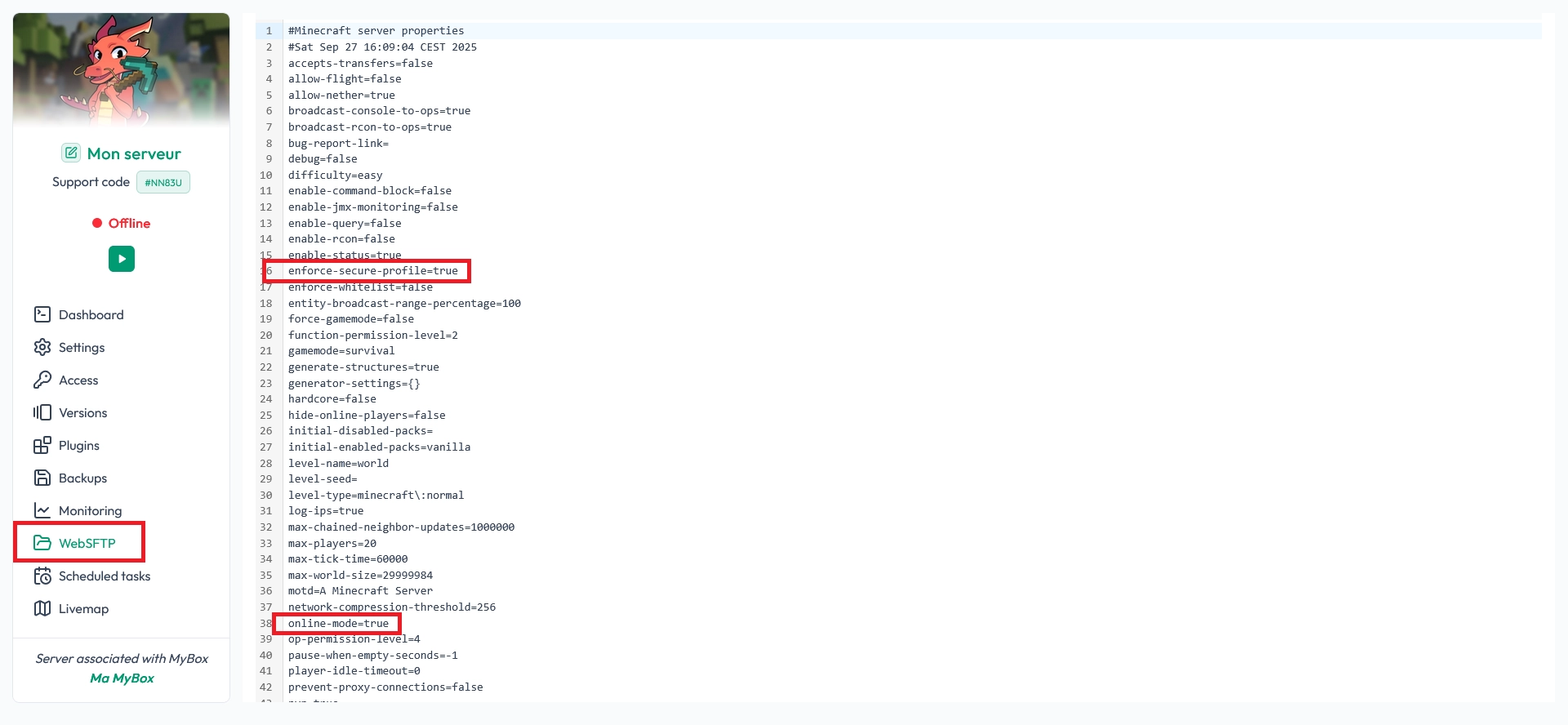
Here is what the relevant part of your server.properties file should look like after the change:
online-mode=false
ensure-secure-profile=false
After editing the file, click the Save button in WebSFTP, then restart your server. From now on, your Minecraft server will accept cracked clients (non-premium accounts).
💡 Tip: Keep a backup of your original
server.propertiesfile so you can quickly go back to premium-only mode if needed.
FAQ: cracked Minecraft servers
Is it legal to run a cracked Minecraft server?
Cracked servers rely on a feature Mojang provides but uses it in a way that is not intended or approved. While this practice is widespread, Mojang has never officially authorised it. If you want to fully respect Mojang’s terms, you should keep your server in premium-only mode.
Do I really need an authentication plugin?
Yes. Without an auth plugin like AuthMe Reloaded, anyone can connect using any nickname, including your staff accounts. This can lead to griefing, data loss, and full server compromise. An auth plugin adds a password layer per account and is mandatory on a cracked Minecraft server.
Will my players lose their inventories when I enable cracked access?
Changing from premium to cracked modifies how player identities are handled. On an existing production server, this often breaks links with stored data, which can result in lost inventories, homes, and plugin or mod data. It is safer to decide your mode before launch or test on a copy of your server first.
Can I switch back to premium-only later?
You can revert the changes at any time by re-enabling online-mode=true and secure profile checks, and by turning back on options like Block Cracked Versions in the panel. However, switching modes repeatedly can cause inconsistencies with player data, so avoid doing it too often.
Conclusion
You now know how to configure your Minecraft server to accept cracked versions: first by adjusting the security options in your panel, then by editing server.properties. Don’t forget the most important part: protecting your cracked server with an authentication plugin and understanding the impact on whitelists and player data.
Want to test these settings on a safe environment before going live? You can try a Minecraft server free for 12 hours, no credit card required, and experiment with cracked access without risking your main world.

 15 December 2025
  Enjoy 10% off your first month of server with MineStrator using the code ACTU10!