




Hello!
In this very short guide, we’ll show you how to install plugins in just one click from your server’s panel!
⚠️ Note: Some plugins have a page on Spigot.org but are actually hosted on third-party sites. For instance, EssentialsX or ViaVersion may appear on Spigot, but if you install them directly, the file will not be valid.
Also, the automatic installation only downloads the plugin. If a plugin requires additional configuration to work properly, you will need to edit it manually (especially for plugins that use an extra port such as VoiceChat or DynMap).
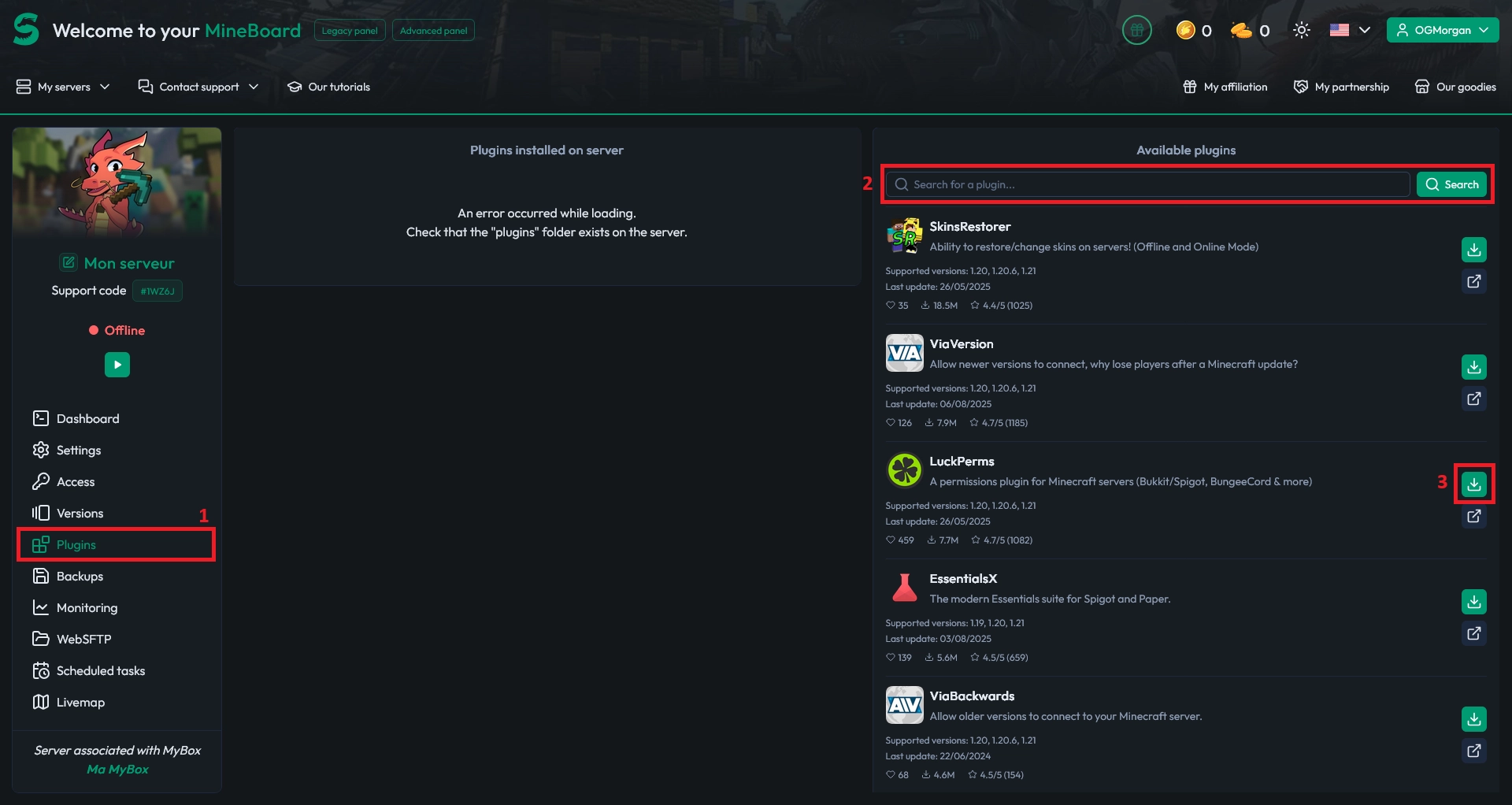
First, go to your server’s Plugins tab and search for the desired plugin. In this example, we're adding LuckPerms.
Click Install, and the plugin will be installed automatically.
That’s it! Now you just need to restart your server once you’ve added all the plugins you want!

 26 September 2025
  Enjoy 10% off your first month of server with MineStrator using the code ACTU10!