


Linking a domain name to your Hytale server is one of those small upgrades that instantly makes it feel “official”. Instead of sharing a hard-to-remember IP, your players can join with something clean like play.your-domain.com:5500.
In this 2026 tutorial, you’ll configure your DNS zone so a subdomain points to your Hytale server. We’ll use OVH as the example, but the exact same logic applies to most registrars.
The core idea is simple: create a DNS A record that links your subdomain to your server’s IP address. Then your players connect using the domain (and the port if needed).
What you need before starting
Before you touch anything in DNS, make sure you have the right info ready. Setting up a domain name for a Hytale server takes only a few minutes, as long as you don’t have to hunt for details mid-way.
Prepare the following:
A Hytale server online and reachable
A domain name with DNS zone access
Your server IP and its port
Example used in this guide: the domain yoshun.fr on OVH, and a server reachable at 127.12.8.25:5500. The goal is to let players connect via play.yoshun.fr:5500 instead of typing the full IP every time.
📝 Note: Registrars may look different, but the key fields are always the same: record type, subdomain/host, target, and TTL.
One last thing: DNS propagation is not instant everywhere. Your change is saved immediately, but some networks and providers can take a bit to update their cache.
💬 Good to know: If your new address doesn’t work right away, wait a few minutes to a few hours. In most cases, you don’t need to change anything else.
Create an A record for your Hytale server
To link a domain name to a Hytale server, you need a DNS record of type A. This record connects a subdomain (like play.your-domain.com) to your server’s IP address.
Log into your domain registrar panel (OVH in our example), open the DNS zone for your domain, then add a new DNS entry.
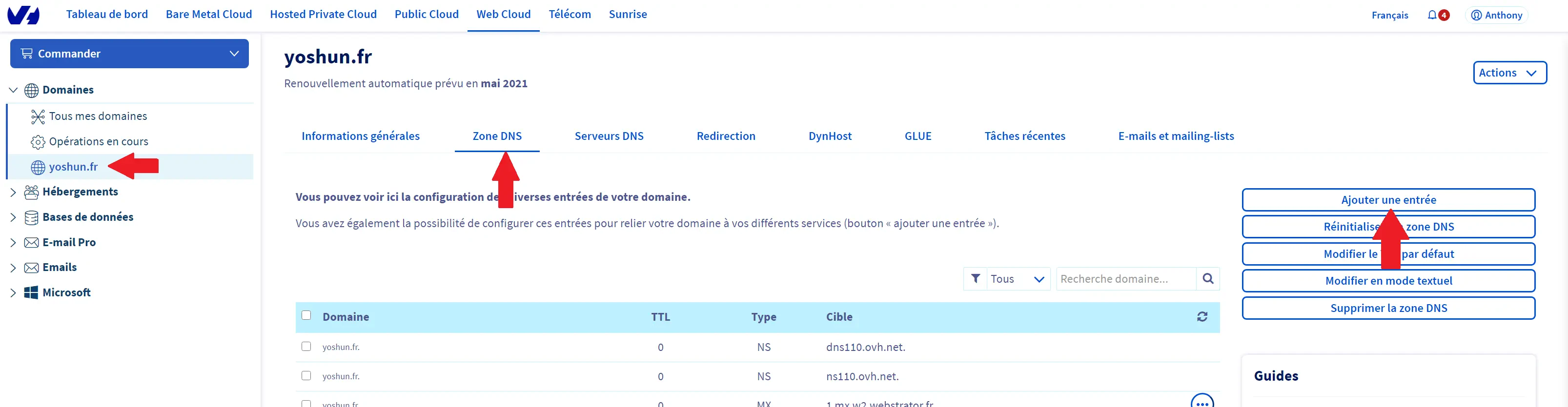
When creating the record, select type A and fill the fields like this:
Subdomain:
play(to getplay.yoshun.fr)TTL: default value
Target: your server IP without the port (example:
127.12.8.25)
Once the A record is saved, your subdomain points to the server’s IP. Players can then join using play.yoshun.fr:5500 (by adding the port at the end).
💡 Tip: With a dedicated IP and your server running on the default port 5520, players can connect via
play.your-domain.comwithout typing any port.
If some players can’t connect immediately, don’t assume it’s broken. Wait for DNS propagation to finish, then try again.
Understand how ports work on Hytale
On Hytale, the port is part of the connection in most situations. If your server isn’t using the default port, your players must join using the format domain:port.
For example, if your server runs on 5500, the correct address is play.yoshun.fr:5500. DNS can point to the IP, but it can’t automatically “guess” which port the client should use.
Why SRV records don’t work on Hytale
Unlike Minecraft, Hytale does not support SRV DNS records. So even if your registrar lets you create an SRV record, it won’t hide the port for Hytale connections.
In practice, that means one thing: if you’re not on the default port 5520, you must show the port in the address, like play.yoshun.fr:5500.
The only way to avoid displaying the port is to use a dedicated IP and configure your Hytale server to start on port 5520. Then players can connect with play.yoshun.fr, nice and clean.
Questions frequently asked
How long does DNS propagation take?
DNS propagation can take anywhere from a few minutes to several hours, depending on your registrar, TTL settings, and network caches. If your A record is correct, it usually fixes itself with a bit of patience.
Should I put the port in the A record?
No. An A record only points to an IP address, never a port. The port is entered by the player when connecting, like play.your-domain.com:5500.
Can I use an SRV record to hide the port?
No, because Hytale doesn’t support SRV records. To avoid showing the port, you must use the default port 5520 (typically possible with a dedicated IP).
Conclusion
You now know how to link a domain name to your Hytale server using a DNS A record. The result is a cleaner address that’s easier to share, like play.your-domain.com:5500, instead of a long IP string.
If anything feels off, check our FAQ or reach out to our support. And if you don’t have a server yet, you can try it free for 12 hours, no credit card required.

 22 January 2026
  Enjoy 10% off your first month of server with MineStrator using the code ACTU10!