




Want all your players to use the same textures, sounds and UI on your Minecraft server? A custom resource pack is the perfect way to control the look and feel of your world. In this guide, you will learn how to install a resource pack directly on your server so it is automatically offered to every player who joins.
We will go through two simple methods: using the MineStrator panel settings, or editing the server.properties file yourself. By the end, your server will prompt players to download your pack as soon as they connect.
Step 1: Prepare your resource pack
Before you touch your server, you first need to download the resource pack you want to use. Make sure it is compatible with your Minecraft version and that it is in .zip format.
Once you have the resource pack file, go to https://minepack.fr/.
Drag and drop your resource pack onto the site, then confirm the upload.
The site will generate the information required for your Minecraft server: a resource pack URL and a resource pack SHA1 hash, displayed like this:
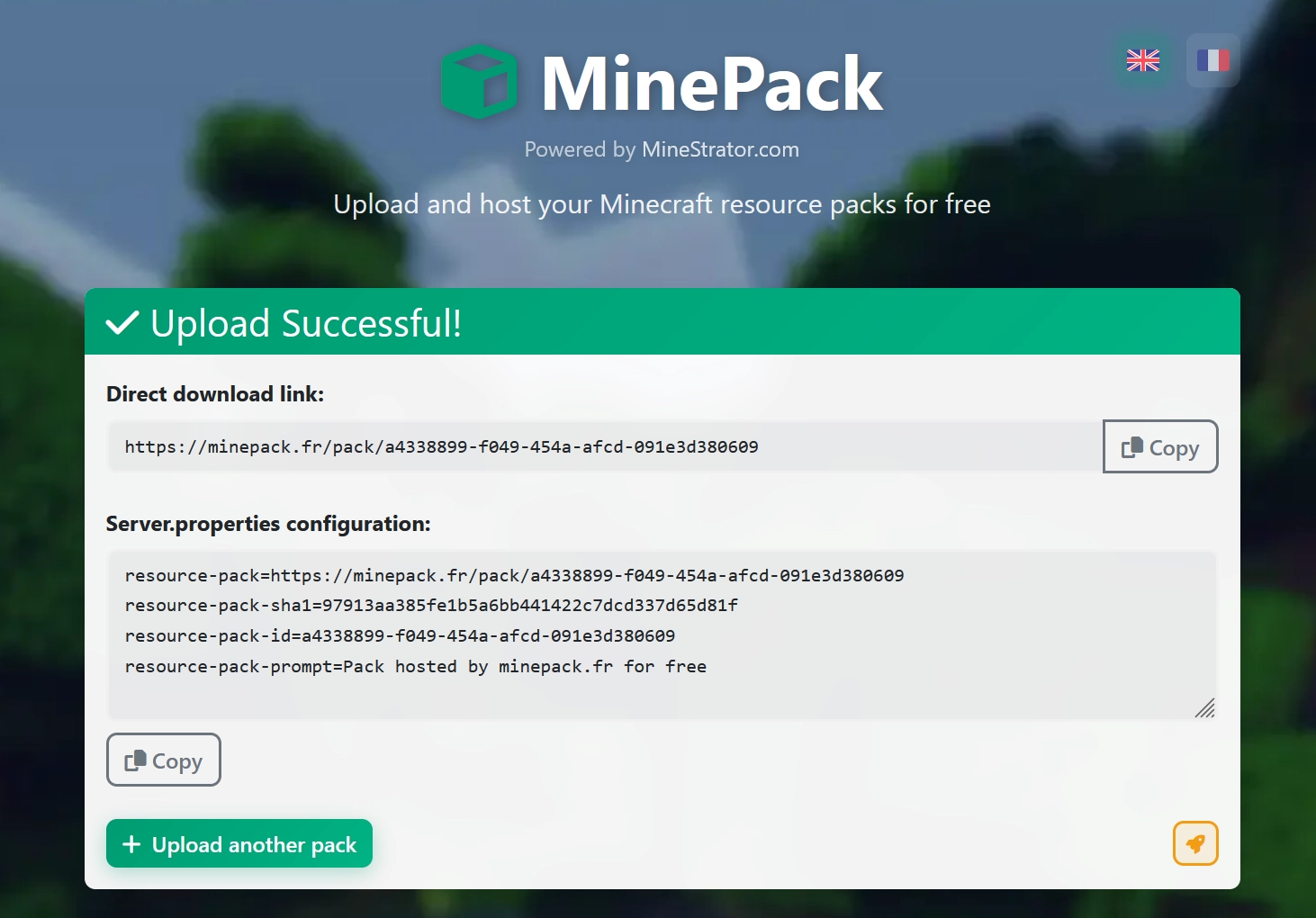
Click the Copy button to copy the generated lines. You will paste these values either into your server.properties file or into the resource pack fields in your panel settings.
💡 Tip: Keep this page open or save the URL and SHA1 hash somewhere safe in case you need to reconfigure your server later.
Step 2: Configure the resource pack in the panel
The easiest way to install a resource pack on your Minecraft server is to use the Settings tab in your MineStrator panel. This avoids editing files manually and reduces the risk of mistakes.
Open your server panel, then go to the Settings (or Parameters) tab. Locate the fields dedicated to the resource pack, usually named resource-pack and resource-pack-sha1.
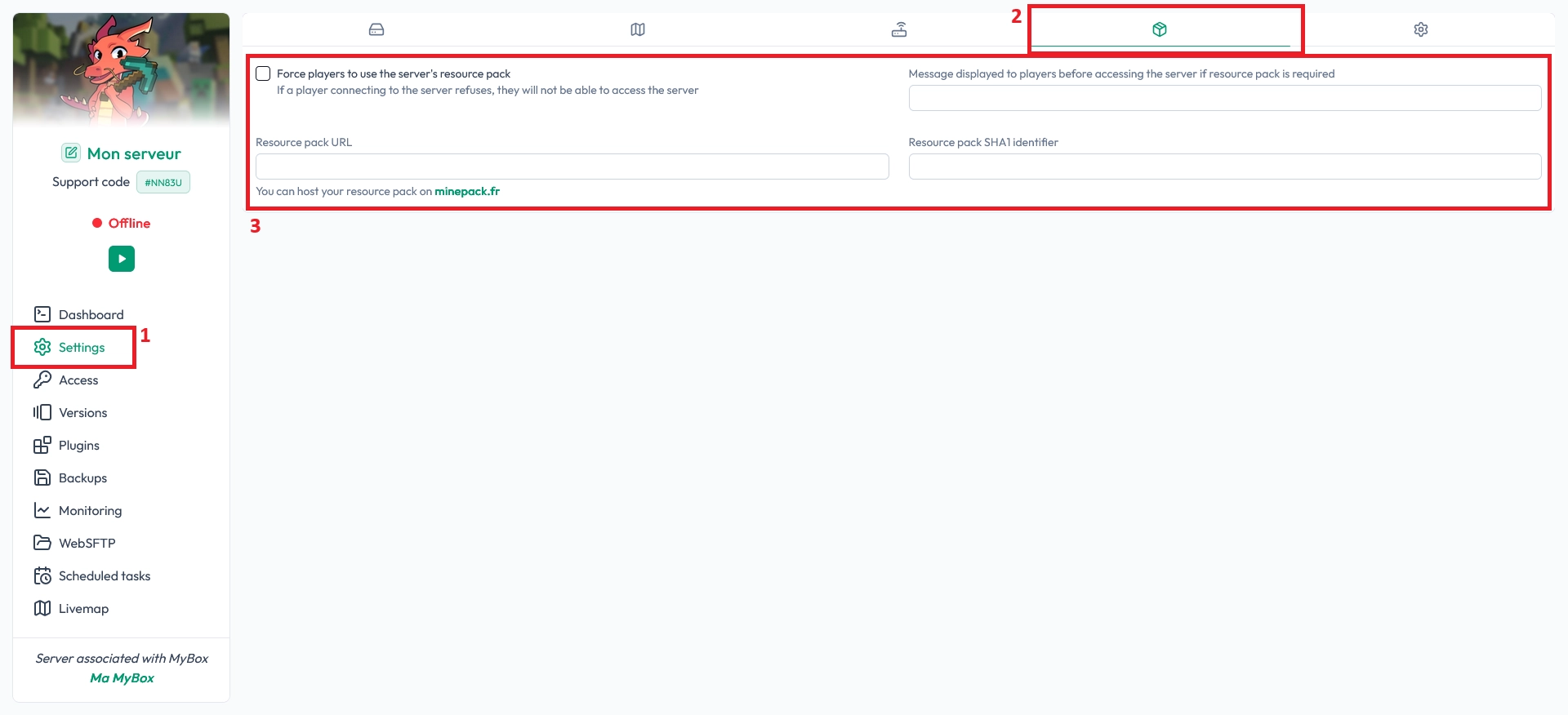
Paste the URL and SHA1 hash you copied from Minepack into the corresponding fields, then save your changes. Finally, restart your server so the new configuration is applied.
📝 Note: After the restart, players joining your Minecraft server will be prompted to download and apply the resource pack automatically.
Step 2 (alternative): Edit server.properties manually
If you prefer working directly with configuration files, you can install the resource pack by editing the server.properties file of your Minecraft server. This method gives you full control and works on any host.
Connect to your server files via FTP or SFTP and open the server.properties file. If you are not sure how to access or edit your files, follow our tutorial on managing your server with WinSCP or FileZilla: manage your server files via FTP.
Inside server.properties, find the lines related to the resource pack and replace their values with what you copied from Minepack:
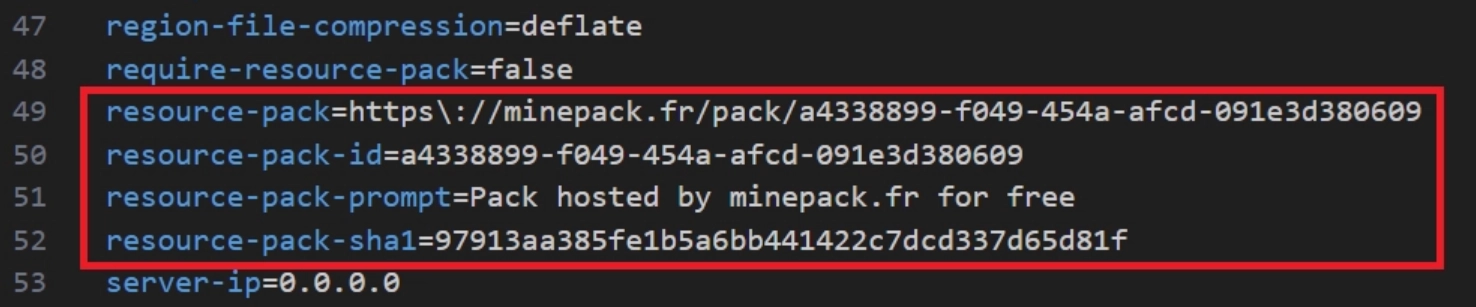
Save the file, then restart your server. When you connect to your Minecraft server again, you should see a message indicating that the resource pack is being downloaded and installed.

⚠️ Warning: If the URL or SHA1 hash is incorrect, the resource pack will fail to download. Double-check that you copied the full values from Minepack.
FAQ: Resource packs on Minecraft servers
Do players have to accept the resource pack?
When a resource pack is configured on your Minecraft server, players receive a prompt when they join. They can accept or refuse it. If you want to make it mandatory, you can enable the option to force the resource pack in advanced server settings or via plugins.
Can I change the resource pack later?
Yes, you can upload a new pack to Minepack, get the new URL and SHA1 hash, then update your panel fields or server.properties. Restart your Minecraft server so the new resource pack is used for future connections.
What happens if the resource pack is too large?
Very large resource packs can take longer to download and may cause players with slow connections to time out. Try to keep your resource pack size reasonable, and host it on a reliable service like Minepack for stable downloads.
Conclusion
You now know two simple ways to install a resource pack on your Minecraft server: through the MineStrator panel settings or by editing server.properties directly. In both cases, your players will be prompted to download your custom pack as soon as they join, giving your world a unique style.
If you want to go further with your Minecraft server, from resource packs to plugins and mods, you can explore all our articles on the MineStrator blog. Don’t have a server yet? Try a Minecraft server free for 12 hours, no credit card required, and start testing your resource pack today.

 21 December 2025
  Enjoy 10% off your first month of server with MineStrator using the code ACTU10!